Use filters to narrow a movie night
Say it’s Friday: you want a thriller, nothing too long, well reviewed, and actually watchable on a service you have. Here is that exact search, filter by filter.
Everything below happens in the filter sidebar next to the catalog grid. Each filter you add shrinks the wall of posters — the goal is a shortlist small enough to actually choose from.
- Open the catalog. Start at the full grid with the filter sidebar beside it. Over 250,000 movies is not a shortlist yet — that’s what the next steps are for.
- Pick the genre. Select Thriller. One honest genre choice does more narrowing than ten minutes of scrolling.
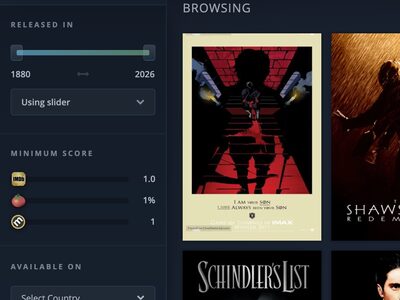
- Set the era with the year slider. The slider runs from 1880 to now. Drag it to 1990–1999 for that specific 90s paranoia, or leave it wide if the decade doesn’t matter tonight.
- Cap the runtime. It’s already late — set the runtime filter to under two hours and every three-hour epic quietly leaves the room.
- Raise the score floor. Set a minimum IMDb, Rotten Tomatoes or Metacritic score. Even a modest floor removes the filler and leaves films someone actually vouched for.
- Filter by where you can watch. Pick your country and the streaming services you pay for, so the shortlist only contains films you can start tonight.
- Sort and decide. Sort what’s left by IMDb, Rotten Tomatoes or Metacritic score and open the top few. On each movie page, the “Available on” selector confirms where it’s playing in your country — arrow keys step through the shortlist, Escape closes.
Signed in, your seenlist and blacklist are folded into the results — films you’ve watched or hidden stop competing for your attention.
Availability comes from JustWatch. It’s a strong signal, not a guarantee — catalogs shift, so the movie page’s “Available on” selector is the thing to double-check.
If the shortlist hits zero, loosen the score floor first. It’s usually the strictest filter in the stack.
The filters are free, no account needed.